How to Build a Custom Hospital Inventory Management Software: Features, Cost and Process (2026 Guide)
In This Article
- Quick Answer: Custom Hospital Inventory Management Software at a Glance
- What Is Hospital Inventory Management Software?
- How Does Hospital Inventory Management Software Work?
- Who Needs a Custom Hospital Inventory Management System?
- Which Types of Hospital Inventory Should the Software Cover?
- 1. Pharmacy and Drug Inventory
- 2. Central Medical Store and Consumables
- 3. Operating Room, Surgical and Implant Stock
- 4. Laboratory Reagents and Diagnostic Supplies
- 5. Medical Equipment and Fixed Assets
- Why Do Hospitals Invest in Custom Inventory Management Software? 8 Key Benefits
- 1. Fewer Stockouts of Critical Supplies
- 2. Less Expiry Waste and Overstocking
- 3. Lower Procurement and Emergency Purchase Costs
- 4. Safer Patient Care and Faster Product Recalls
- 5. Less Manual Work for Nurses, Pharmacists and Store Staff
- 6. Tighter Control Over Theft, Pilferage and Misuse
- 7. Accurate Patient Billing and Less Revenue Leakage
- 8. Audit-Ready Records and Easier Compliance
- 12 Must-Have Features of Hospital Inventory Management Software
- 1. Real-Time Stock Tracking Across Stores and Departments
- 2. Batch, Lot, and Expiry Tracking with First-expired, First-out
- 3. Low-Stock Alerts and Automated Reordering
- 4. Barcode, QR Code and RFID Scanning
- 5. Purchase Order and Supplier Management
- 6. Department Requisitions and Approval Workflows
- 7. Multi-Location Stock Visibility and Transfers
- 8. Controlled Drug and High-Value Item Tracking
- 9. Patient-Level Consumption and Billing Capture
- 10. Role-Based Access and Audit Trails
- 11. Reports, Dashboards and Analytics
- 12. Mobile Access for Ward, Pharmacy and Store Teams
- 5 Advanced and AI Features Worth Planning For
- 1. AI-Driven Demand Forecasting
- 2. Smart Cabinets, Weight-Sensing Bins and Touchless Tracking
- 3. Anomaly, Theft and Usage Pattern Detection
- 4. Automated Recall Management
- 5. Supplier Performance Analytics
- Which Hospital Systems Should It Integrate With?
- Which Compliance and Security Standards Must It Meet?
- 1. HIPAA and Protected Health Information
- 2. HL7 and FHIR Interoperability
- 3. Drug and Device Traceability Rules (DSCSA and FDA UDI)
- 4. Controlled Substance Records and Audit Trails
- 5. GDPR and UK GDPR for European and UK Buyers
- Build vs Buy: Should You Choose Custom or Off-the-Shelf Hospital Inventory Software?
- 1. Custom vs Off-the-Shelf: Side-by-Side Comparison
- 2. When Buying or Upgrading Makes Sense
- 3. When Custom Development Is the Better Choice
- How to Build Custom Hospital Inventory Management Software in 10 Steps
- Step 1: Audit Your Current Inventory Workflows and Gaps
- Step 2: Define Requirements, Scope and MVP Features
- Step 3: Plan Compliance and Security from Day One
- Step 4: Design the Architecture and Choose the Tech Stack
- Step 5: Design a Simple, Mobile-First User Experience
- Step 6: Develop the Core Inventory Modules
- Step 7: Integrate with EHR, HMS, Pharmacy and Supplier Systems
- Step 8: Clean and Migrate Existing Inventory Data
- Step 9: Test for Functionality, Security and Load
- Step 10: Roll Out in Phases, Train Staff and Plan Ongoing Support
- What Architecture and Tech Stack Does the Software Need?
- How Much Does It Cost to Build Hospital Inventory Management Software?
- 1. Cost by Scope: Basic, Mid-Level and Enterprise
- 2. 7 Factors That Drive the Cost
- 3. Development Timeline by Scope
- 4. Ongoing Costs After Launch
- 5. How to Control Cost Without Cutting Corners
- What Are the Common Challenges, and How Do You Avoid Them?
- 1. Integration with Legacy Hospital Systems
- 2. Poor Data Quality Before Go-Live
- 3. Staff Resistance and Low Adoption
- 4. Scope Creep and Budget Overruns
- 5. Compliance Gaps Found Too Late
- 6. Downtime in a 24/7 Clinical Environment
- 7. Systems That Cannot Scale to New Departments or Branches
- 7 Best Practices to Get Full Value After Launch
- 1. Classify Stock with ABC and VED Analysis
- 2. Apply First Expired, First Out (FEFO)
- 3. Set Par Levels and Reorder Points per Department
- 4. Run Small, Regular Cycle Counts
- 5. Standardize the Item Master and Naming
- 6. Assign Clear Ownership for Every Store
- 7. Review Inventory KPIs Every Month
- How to Choose a Hospital Inventory Software Development Partner
- 1. Proven Healthcare Software Experience
- 2. Compliance and Security Practices
- 3. Integration Expertise with EHR, HMS, and ERP Systems
- 4. Relevant Case Studies and References
- 5. Transparent Pricing and Engagement Models
- 6. Post-Launch Support and SLAs
- 7. Code Ownership, Communication and Working Fit
- Why Murmu Software Infotech for Hospital Inventory Management Software Development
- Conclusion: Build the System Around Your Hospital's Workflow
- Frequently Asked Questions
- 1. How much does it cost to build custom hospital inventory management software?
- 2. How long does it take to build hospital inventory management software?
- 3. Is custom hospital inventory management software better than off-the-shelf software?
- 4. Can hospital inventory management software integrate with EHR, HMS, and billing systems?
- 5. What is the difference between hospital stock management software and pharmacy inventory management software?
- 6. Can a medical store inventory management system run within the hospital system?
- 7. Is cloud-based hospital inventory management software secure and HIPAA compliant?
- 8. What hardware is needed for barcode and RFID inventory tracking?
A strong hospital inventory solution should give teams one reliable view of stock across pharmacies, stores, wards, and other locations. Prioritize batch and expiry tracking, FEFO, automated reordering, barcode/RFID, department requests, patient-level usage, reporting, and integrations. For larger hospitals, plan scalability, compliance, data migration, and ongoing support before development begins.
A busy hospital can lose time and money when supplies are hard to track. A critical item runs out, a batch expires on the shelf, or staff spend too much time searching across stores and wards. These small gaps can affect daily operations and patient care.
The right hospital inventory management software can bring stock tracking, purchasing, storage, and usage into one system. That is why hospitals looking for better control may choose a custom solution with the right hospital management software development partner.
But choosing the right system is not just about features or cost. Integrations, compliance, customization, support, and the number of locations can all affect the final investment, which can range from $40,000 to $500,000+ and take 3 to 12 months to build.
In this guide, you will learn:
- What hospital inventory software offers
- The must-have and advanced features
- Key integrations and compliance requirements
- Build vs. buy considerations
- The 10-step development process
- Cost, timeline, and common risks
- How to choose the right development partner
By the end of this guide, you will know what to build, what budget to expect, and which questions to ask before choosing a partner.
Control Hospital Inventory Smarter
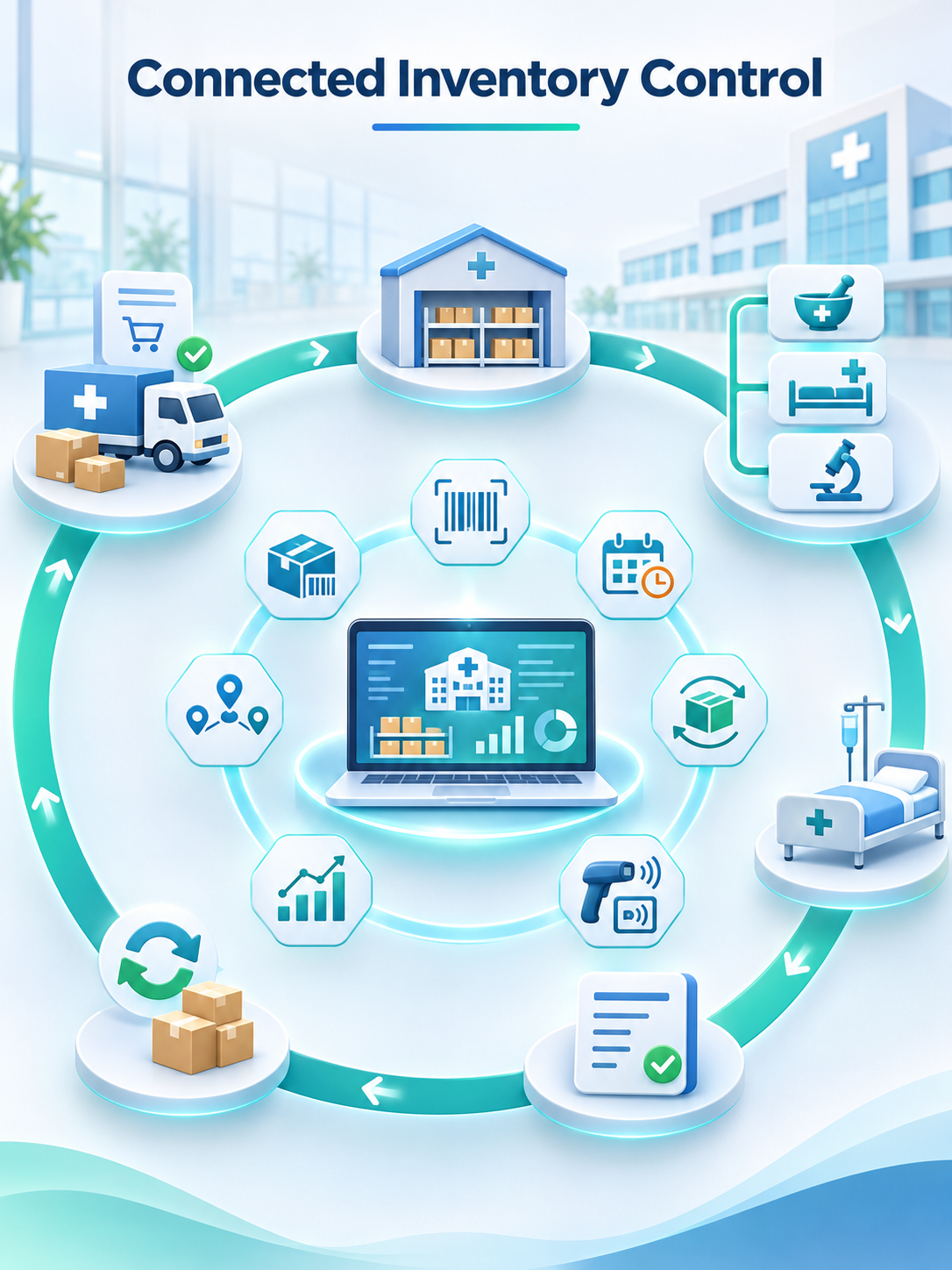
Connect stock, purchasing, pharmacy, wards, billing and suppliers through one traceable inventory platform designed around real hospital workflows.
Quick Answer: Custom Hospital Inventory Management Software at a Glance
If you need the essentials first, here is what matters most:
- What it is: A central system for managing medicines, consumables, and medical devices from purchase to patient use.
- Who needs it: Hospitals, hospital groups, clinic networks, and diagnostic centers with multiple stores or departments.
- Must-have features: Real-time stock tracking, batch and expiry control, automated reordering, barcode scanning, purchase orders, and audit trails.
- Cost: A basic build can start around $40,000, while enterprise systems can exceed $500,000.
- Timeline: Basic versions may take 3-4 months, while multi-site systems can take 8-12 months or more.
- Build or buy: Buy for standard workflows. Choose custom development when integrations, compliance, or multi-site control require more flexibility.
- Partner: Look for healthcare experience, strong integration skills, security expertise, and reliable post-launch support.
What Is Hospital Inventory Management Software?
Hospital inventory management software is a central system for tracking and managing medicines, surgical supplies, consumables, lab reagents, and medical equipment.
Unlike generic stock tools, it supports healthcare needs such as batch and expiry tracking, patient-level usage, and audit trails. It is also known as a hospital inventory management system or hospital stock management software.
How Does Hospital Inventory Management Software Work?
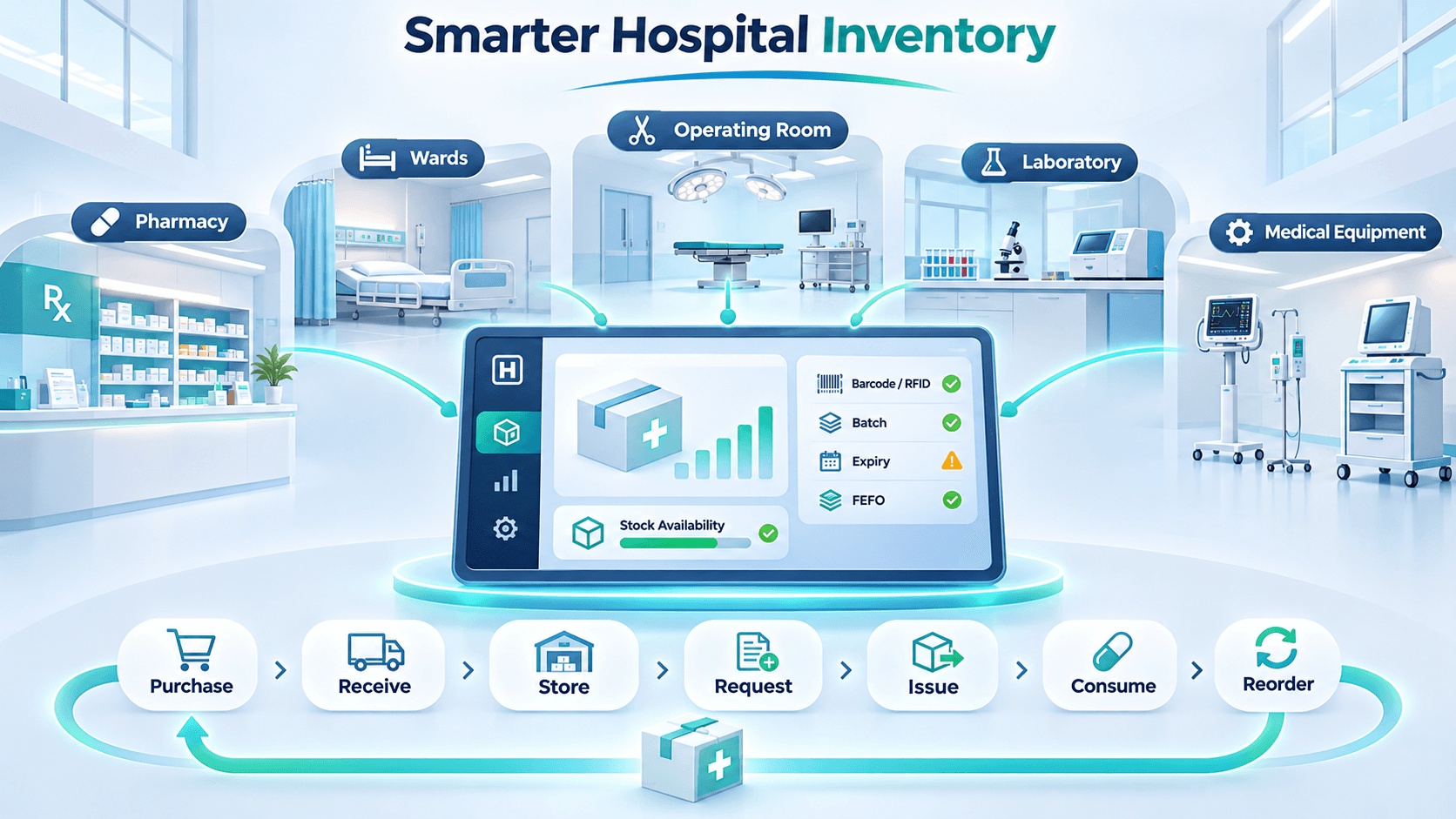
It connects the full inventory workflow:
- Purchase: Creates purchase orders when stock is low.
- Receive: Records quantity, batch, and expiry details.
- Store: Assigns items to the right location.
- Request: Lets departments submit stock requests.
- Issue: Records stock movement between locations.
- Consume: Tracks usage by patient, procedure, or department.
- Reorder: Sends low-stock and expiry alerts.
This gives teams one clear view of stock, movement, and availability.
Who Needs a Custom Hospital Inventory Management System?
Custom development is useful when standard tools cannot handle multiple locations, traceability, or integrations.
- Multi-specialty hospitals: Manage stock across departments and stores.
- Hospital groups and chains: Track inventory across branches.
- Clinic networks: Combine local inventory with central reporting.
- Diagnostic centers and labs: Track reagents and test kits.
- Hospital pharmacies and medical stores: Manage batches, billing, and controlled drugs.
Also Read: Case Study: Hospital Management System (HMS)
Which Types of Hospital Inventory Should the Software Cover?
Hospitals manage different types of inventory, and each has different tracking needs. Your software should support all five, even if you roll them out in phases.
1. Pharmacy and Drug Inventory
Pharmacy stock needs batch, expiry, controlled drug, and substitution tracking. The module should also connect with dispensing and billing to support pharmacy inventory management. Our pharmacy management system case study shows this in practice.
2. Central Medical Store and Consumables
Gloves, syringes, dressings, and IV sets move through the central store in large volumes. A medical store inventory management system tracks receipts, issues, and transfers to each ward. It also helps identify department-level usage and prevent over-ordering.
3. Operating Room, Surgical and Implant Stock
Surgical supplies and implants are costly, and missing items can delay procedures. The system should track implants, sutures, and instrument sets by case and surgeon preference. Implant identifiers should also link each device to the patient who received it.
4. Laboratory Reagents and Diagnostic Supplies
Reagents and test kits often have short shelf lives and specific storage requirements. Track lot numbers, opening dates, expiry dates, and storage conditions for each item. This helps labs use valid stock first and avoid expired kits.
5. Medical Equipment and Fixed Assets
Equipment such as infusion pumps, monitors, and wheelchairs also needs proper inventory control. Track its location, maintenance schedule, and calibration status in the same system. This makes equipment easier to find and keeps service schedules on track.
Why Do Hospitals Invest in Custom Inventory Management Software? 8 Key Benefits
Poor inventory control can increase costs and create patient safety risks. A Cardinal Health hospital supply chain survey found that 78% of respondents still counted inventory by hand in parts of their supply chain.
1. Fewer Stockouts of Critical Supplies
Stockouts can delay care when essential supplies are unavailable. In the Cardinal Health survey, 18% of hospital staff knew of a patient harmed because supplies were missing. Real-time stock levels and reorder alerts help teams act before supplies run out.
2. Less Expiry Waste and Overstocking
Poor visibility often leads teams to order more stock than they need. Expiry alerts and first-expired-first-out (FEFO) picking help move older batches first. This reduces expired stock, unnecessary purchases, and storage waste.
3. Lower Procurement and Emergency Purchase Costs
Accurate consumption data helps teams plan purchases and manage supplier contracts. It also reduces rush orders, premium shipping, and emergency purchases. Procurement teams can use real usage data to negotiate better prices and quantities.
4. Safer Patient Care and Faster Product Recalls
Expired or recalled products can create serious patient safety risks. One in four hospital staff in the Cardinal Health survey had seen or heard of this happening. Batch tracking helps block expired stock and quickly locate recalled lots.
5. Less Manual Work for Nurses, Pharmacists and Store Staff
Inventory tasks take time away from patient care. The Cardinal Health survey found that physicians and nurses spend nearly 20% of their workweek on supply chain and inventory work. Barcode scanning, digital requests, and automatic updates reduce this manual workload.
6. Tighter Control Over Theft, Pilferage and Misuse
High-value medicines and devices need clear movement records. Role-based access and check-out logs show who took an item, when, and for which patient. This makes unexplained losses easier to identify and control.
7. Accurate Patient Billing and Less Revenue Leakage
Items used during patient care can be missed during billing when records are manual. Linking consumption to the patient helps transfer charges directly to the bill. This reduces missed entries and revenue leakage.
8. Audit-Ready Records and Easier Compliance
Auditors need clear records of inventory movements and adjustments. The system logs receipts, issues, transfers, and changes with users and timestamps. Teams can then retrieve the required records without rebuilding history from paper registers.
Control Hospital Inventory Costs Before Stock Problems Grow
12 Must-Have Features of Hospital Inventory Management Software
These 12 features cover the core needs of a reliable medical inventory management software. They support stock control, purchasing, tracking, billing, and reporting.
1. Real-Time Stock Tracking Across Stores and Departments
Track stock levels and locations in real time across pharmacies, wards, and central stores. Every receipt, transfer, or usage updates the same record. This gives teams an accurate view instead of relying on outdated spreadsheets.
2. Batch, Lot, and Expiry Tracking with First-expired, First-out
Track batch numbers and expiry dates for medicines, sterile items, and other sensitive stock. Use first-expired, first-out (FEFO) to issue older stock before newer batches. This reduces expiry waste and makes recalls easier to manage.
3. Low-Stock Alerts and Automated Reordering
Set minimum stock levels for each item and receive alerts when supplies fall below them. The system can also create purchase orders when replenishment is needed. Approval steps keep automated reordering within your budget controls.
4. Barcode, QR Code and RFID Scanning
Use barcode and QR scanning to record items, batches, and quantities with less manual entry. RFID can track tagged high-value items without requiring staff to scan each one. This improves inventory accuracy and speeds up daily stock updates.
5. Purchase Order and Supplier Management
Manage suppliers, prices, lead times, and order history in one place. Create purchase orders and match deliveries against ordered quantities. Supplier data also helps teams compare pricing and monitor delivery performance.
6. Department Requisitions and Approval Workflows
Let wards and departments request stock digitally instead of using calls or paper slips. Route each request to the right approver and record the decision. Store teams can also see demand early and prepare stock before shortages occur.
7. Multi-Location Stock Visibility and Transfers
View stock across stores, departments, and branches from one system. Support transfers when one location has extra stock, and another has a shortage. Our multi-location hospital management software case study explains this approach.
8. Controlled Drug and High-Value Item Tracking
Give narcotics, implants, and costly devices stricter controls than regular inventory. Use approvals, witness records, and running balances to maintain a clear chain of custody. Detailed records also make regulatory checks and internal reviews easier.
9. Patient-Level Consumption and Billing Capture
Link issued items to a patient, procedure, or cost center for accurate usage records. This helps calculate the true cost of each case and supports accurate billing. It also closes the gap between stock issued and charges recorded.
10. Role-Based Access and Audit Trails
Give users access based on their roles and responsibilities within the hospital. Nurses can request stock, storekeepers can issue it, and managers can approve adjustments. Every action is recorded with the user, time, and reason for better control.
11. Reports, Dashboards and Analytics
Track stock value, fast and slow-moving items, near-expiry stock, and department-level consumption. These reports help teams plan purchases, manage budgets, and identify inventory problems early. Better visibility turns inventory data into useful management decisions.
12. Mobile Access for Ward, Pharmacy and Store Teams
Let staff scan, request, and confirm stock directly from mobile devices while working on the floor. This reduces the need to return to a desktop for routine inventory tasks. A simple mobile workflow also makes it easier for staff to keep records updated.
5 Advanced and AI Features Worth Planning For
You do not need these features on day one, but your architecture should leave room for them. They turn a tracking system into one that predicts and prevents problems.
1. AI-Driven Demand Forecasting
Forecasting models study your past consumption, seasonal illness patterns, and procedure schedule. They then predict what the hospital will need weeks ahead, so teams can order before demand spikes. We explain how to add this safely in our guide to AI healthcare software development.
2. Smart Cabinets, Weight-Sensing Bins and Touchless Tracking
Smart cabinets and weight-sensing bins record usage without a manual scan. When a nurse removes an item, the system updates the count and can trigger a restock. This helps most in emergency and operating areas, where staff have no time to stop and scan.
3. Anomaly, Theft and Usage Pattern Detection
Machine learning can flag usage that does not fit the normal pattern. A sudden rise in one ward's consumption or repeated manual adjustments will stand out quickly. Teams can then investigate early, whether the cause is an error, waste, or deliberate misuse.
4. Automated Recall Management
When a supplier recalls a batch, every minute matters. The system should locate every unit of that lot, show where it went, and list the affected patients. It can also lock the batch, so nobody issues it while the team responds.
5. Supplier Performance Analytics
Purchase history holds more insight than most teams use. Supplier analytics score each vendor on delivery time, fill rate, price changes, and quality issues. Procurement teams can enter contract talks with evidence and line up alternatives before a supplier lets them down.
Which Hospital Systems Should It Integrate With?
Your hospital inventory management software should connect with clinical, pharmacy, billing, finance, and supplier systems. These integrations reduce duplicate data entry and keep inventory records accurate.
| System | What It Connects | Why It Matters |
|---|---|---|
| HMS and EHR/EMR | Links inventory use with patient records and orders | Better usage tracking and traceability |
| Pharmacy and billing | Sends dispensed items to patient bills | Fewer missed charges and faster billing |
| ERP and accounting | Shares purchasing, stock value, and payment data | Accurate finances and stock valuation |
| Procurement and supplier portals | Exchanges orders, confirmations, and invoices | Fewer errors and shorter lead times |
| Barcode, RFID, and IoT devices | Sends scans and sensor data to inventory records | Less manual work and better accuracy |
Most integrations use APIs and healthcare standards such as HL7 and FHIR. If you already use an ERP, our healthcare ERP software case study shows how inventory, finance, and procurement can work together.
Which Compliance and Security Standards Must It Meet?
The system must protect patient data, support standard data exchange, and keep traceable records for drugs and devices. HIPAA is central for US hospitals, while UK and European sites may also need GDPR. Your legal and compliance teams should confirm which rules apply to your organization.
1. HIPAA and Protected Health Information
When inventory data links to a patient, it can become protected health information (PHI). Plan for encryption, access controls, audit logs, and a signed business associate agreement. The HIPAA Security Rule sets the required safeguards, as shown in our HIPAA healthcare software case study.
2. HL7 and FHIR Interoperability
Your inventory system should exchange data with EHRs and clinical systems in standard formats. HL7 FHIR supports modern healthcare data exchange and interoperability. Make sure medications, devices, and supply records are mapped correctly to avoid integration gaps.
3. Drug and Device Traceability Rules (DSCSA and FDA UDI)
US hospitals need strong traceability for prescription drugs and medical devices. The Drug Supply Chain Security Act supports package-level drug tracing, while FDA Unique Device Identification provides identifiers for medical devices. Your system should capture this data to simplify recalls and audits.
4. Controlled Substance Records and Audit Trails
Controlled drugs require stricter inventory records and accountability. Under US federal rules in 21 CFR Part 1304, required records must generally be kept for at least two years. The system should maintain these records and support the required inventory checks through clear, audit-ready reports.
5. GDPR and UK GDPR for European and UK Buyers
Health data is treated as special category data under the GDPR. Systems serving UK or European patients need a lawful basis, controlled access, and clear data retention rules. Also confirm where data is hosted because storage location can affect your compliance requirements.
Build vs Buy: Should You Choose Custom or Off-the-Shelf Hospital Inventory Software?
Choose off-the-shelf software when your workflows are standard, and you need to launch quickly. Choose custom hospital inventory software when you need deeper integrations, multi-site control, or compliance rules that packaged tools cannot handle.
1. Custom vs Off-the-Shelf: Side-by-Side Comparison
| Factor | Off-the-Shelf Software | Custom Software |
|---|---|---|
| Time to launch | Weeks to a few months | 3 to 12 months or more |
| Upfront cost | Lower | Higher |
| Ongoing cost | License fees may increase with users and sites | You pay for hosting, maintenance, and updates |
| Workflow fit | You adapt to the product | The product adapts to your workflows |
| Integrations | Standard connectors with limited depth | Built around your exact system |
| Compliance control | Depends on vendor features | Built into the system architecture |
| Scalability | Depends on the vendor roadmap | Planned around your growth |
| Ownership | Vendor owns the product | You own the code and data model |
2. When Buying or Upgrading Makes Sense
A packaged product suits a single facility with routine stock workflows and a tight deadline. You get a tested tool quickly, and the vendor carries the maintenance burden.
Upgrading is another sensible route. If your current system is stable, you can add barcode scanning, analytics, or new integrations instead of starting over.
3. When Custom Development Is the Better Choice
Custom development makes sense when your inventory workflows are too specific for a packaged product. The higher upfront investment gives you more control over integrations, ownership, compliance, and future growth.
- Several sites or stores: Get one view of inventory across branches and locations.
- Complex integrations: Connect EHR, ERP, pharmacy, billing, and supplier systems more deeply.
- Specialized inventory: Support implants, controlled drugs, cold-chain items, and other specific rules.
- Strict compliance: Build audit trails, access controls, and traceability into the core system.
- Long-term growth: Add departments, locations, integrations, or AI features without depending on a vendor roadmap.
For a wider view of this decision, read our custom healthcare software case study.
Now that you know when custom development makes sense, let’s look at the build process step by step.
How to Build Custom Hospital Inventory Management Software in 10 Steps
A successful build starts with clear workflows, focused requirements, and strong planning. These 10 steps keep development, testing, rollout, and support on track.
Step 1: Audit Your Current Inventory Workflows and Gaps
Map how inventory moves from suppliers to the central store, pharmacy, wards, and patients. Identify missing stock, expired items, duplicate counts, and manual work that should become system requirements.
Involve pharmacists, nurses, storekeepers, and finance teams early in the process. Their input helps your partner understand real workflows instead of designing around assumptions.
Step 2: Define Requirements, Scope and MVP Features
Turn the workflow gaps into clear requirements and divide them into must-have, should-have, and later features. Your must-haves become the minimum viable product (MVP) for the first release.
Keep the MVP focused on stock tracking, expiry control, reordering, and reporting. A focused launch reduces cost and lets real users guide the next development phase.
Step 3: Plan Compliance and Security from Day One
Identify applicable regulations before designing the system, then define what data you store, who can access it, and how long it must be retained. Your partner should turn these requirements into technical controls.
Plan for encryption, role-based access, audit logs, backups, and other security controls from the start. Building them in early is safer and less expensive than fixing compliance gaps after launch.
Step 4: Design the Architecture and Choose the Tech Stack
Choose an architecture that can support your current workflows while leaving room for new locations, integrations, and features. Your partner should clearly explain where data lives and how each module connects.
A cloud-based, modular design with open APIs can make future expansion easier. The right architecture helps you add integrations or AI capabilities without rebuilding the core system.
Step 5: Design a Simple, Mobile-First User Experience
Create clickable prototypes for the staff who will use the system every day, including nurses and storekeepers. Test real workflows early and fix confusing screens before development moves too far.
Keep routine tasks fast, with clear alerts, large buttons, and scan-first workflows. On a busy ward, ease of use matters more than visual complexity.
Step 6: Develop the Core Inventory Modules
Build the system in short development cycles, or sprints, with each sprint delivering working modules. These may include the item master, goods receipt, stock issues, transfers, and department requisitions.
Review a working demo every two weeks and provide feedback before the next sprint begins. Regular reviews catch misunderstandings early and help keep scope and budget under control.
Step 7: Integrate with EHR, HMS, Pharmacy and Supplier Systems
Connect the new system with your existing EHR, HMS, pharmacy, billing, ERP, and supplier platforms. Start with the integrations that remove the most manual data entry and create the biggest operational benefit.
Define what data moves between each system and in which direction. Also plan for failed connections or downtime so inventory records remain accurate and consistent.
Step 8: Clean and Migrate Existing Inventory Data
Review old spreadsheets and systems before migration to remove duplicates, correct item names, and standardize units of measure. Clean source data prevents inaccurate records from entering the new system.
Complete a physical inventory count before go-live and use verified opening balances. Accurate starting data builds staff trust and gives teams a reliable inventory baseline.
Step 9: Test for Functionality, Security and Load
Test every core workflow, including stock movements, expiry alerts, reorder triggers, integrations, user permissions, and reports. Security and load testing should also confirm that the system can handle real hospital usage.
Let hospital staff perform user acceptance testing with real scenarios before approval. Fixing issues before launch is far less disruptive than resolving them after teams depend on the system.
Step 10: Roll Out in Phases, Train Staff and Plan Ongoing Support
Start with one area, such as the pharmacy or central store, before expanding to wards, operating rooms, and other locations. A phased rollout makes problems easier to identify and resolve before wider adoption.
Train each team on the tasks they actually perform and assign a super user in every department. Agree on ongoing support for fixes, updates, maintenance, and future feature development.
Also Read: Healthcare Digital Transformation Consulting for Hospitals
Plan Smarter Hospital Inventory Before Development Costs Increase
What Architecture and Tech Stack Does the Software Need?
A hospital inventory management system typically has five layers: apps, backend, integrations, tracking, and cloud security. Each layer supports a different part of inventory control and daily hospital operations.
| Layer | What It Does | Common Technology Choices |
|---|---|---|
| Web and mobile apps | Gives staff, managers, and admins access to inventory workflows | React or Angular for web, Flutter or React Native for mobile |
| Backend and database | Handles business rules, stock records, and reports | Node.js, .NET, Python, or Java with PostgreSQL or SQL Server |
| Integration layer | Connects EHR, ERP, pharmacy, and supplier systems | REST APIs with HL7 and FHIR interfaces |
| Tracking layer | Captures item movement with less manual work | Barcode and QR scanners, RFID readers, and IoT sensors |
| Cloud hosting and security | Runs the system and protects healthcare data | AWS, Microsoft Azure, or Google Cloud with encryption and access controls |
Do not choose the technology stack based on personal preference. Ask your development partner to explain each choice based on your existing systems, team skills, security needs, and long-term support.
How Much Does It Cost to Build Hospital Inventory Management Software?
Custom hospital inventory management software typically costs $40,000 to $500,000+, depending on scope, integrations, compliance, and scale. These are market planning ranges, not Murmu Software Infotech pricing.
1. Cost by Scope: Basic, Mid-Level and Enterprise
| Scope | What It Typically Includes | Market Cost Range (USD) | Typical Timeline |
|---|---|---|---|
| Basic | Single facility, core stock tracking, expiry alerts, reordering, and standard reports | $40,000 to $80,000 | 3 to 4 months |
| Mid-level | Multiple departments, EHR and pharmacy integration, batch tracking, dashboards, and audit logs | $80,000 to $200,000 | 4 to 8 months |
| Enterprise | Multi-site network, deep EHR and ERP integration, AI forecasting, analytics, and high availability | $200,000 to $500,000+ | 8 to 12+ months |
For a figure closer to your own scope, try our project cost calculator.
2. 7 Factors That Drive the Cost
Your hospital inventory management software cost depends on seven main factors, including feature scope, integrations, compliance, users, locations, hardware, data migration, and team location.
Understanding these factors helps you compare quotes clearly and avoid unexpected costs during development.
- Feature scope: More modules and workflows require more design, development, and testing.
- Number of integrations: EHR, ERP, pharmacy, and supplier connections add mapping and testing work.
- Compliance needs: HIPAA, GDPR, and traceability controls add security and documentation work.
- Sites and users: Multi-branch systems need stronger architecture, permissions, and reporting.
- Hardware and tracking: RFID readers, smart cabinets, and scanners add costs outside the software budget.
- Data migration: Cleaning and transferring old inventory records can require significant effort.
- Team location and model: Onshore, nearshore, and offshore teams have different development rates.
3. Development Timeline by Scope
A basic build usually takes 3 to 4 months, a mid-level build takes 4 to 8 months, and an enterprise system can take 8 to 12 months or more. Complex integrations and data migration often add time, so planning them early helps avoid delays and supports a smoother phased rollout.
4. Ongoing Costs After Launch
The budget does not end at go-live. Plan for cloud hosting, security updates, bug fixes, user support, maintenance, and future features, and ask your partner for a written support quote before signing so the long-term cost is clear from the start.
5. How to Control Cost Without Cutting Corners
Control costs through scope and sequencing rather than cutting quality or essential testing. Start with an MVP, reuse suitable HMS modules, phase advanced features, and use a fixed discovery phase to define the scope clearly before major development begins.
Also Read: Hospital Software Support and Maintenance Services
Now that you have a realistic budget in mind, let’s look at the challenges that can push a project off course.
What Are the Common Challenges, and How Do You Avoid Them?
Most hospital inventory software projects face a few recurring problems. Planning for them early helps protect the budget, timeline, and user adoption.
1. Integration with Legacy Hospital Systems
Older EHR, pharmacy, and ERP systems were never designed to share data. You avoid trouble by auditing every system early and choosing an API-first approach. Where a legacy system has no API, your partner can add a middleware layer that translates between old and new.
2. Poor Data Quality Before Go-Live
Duplicate items, inconsistent names, and missing batch details can quickly reduce trust in a new system. Clean the data before migration, standardize item codes and units, and verify opening stock with a physical count.
3. Staff Resistance and Low Adoption
Staff will avoid software that makes routine work harder or slower. Involve nurses, pharmacists, and storekeepers in design reviews, test prototypes during real workflows, and use their feedback to improve adoption.
4. Scope Creep and Budget Overruns
New ideas arrive throughout a project, and each one seems small. Protect your budget with a signed scope, a change request process, and a clear MVP boundary. Park good ideas in a later phase, so your first release still ships on time.
5. Compliance Gaps Found Too Late
Late security or compliance issues can cause expensive rework and audit problems. Involve your compliance team early and review access controls, audit logs, encryption, and other requirements at every major milestone.
6. Downtime in a 24/7 Clinical Environment
Hospitals cannot stop inventory operations when a system goes offline. Use redundant infrastructure, automatic failover, tested backups, and an offline process that lets teams issue critical stock and sync records later.
7. Systems That Cannot Scale to New Departments or Branches
A system designed only for current needs can become a bottleneck as the hospital grows. Choose a modular architecture that supports new locations, departments, and item types without requiring a complete rebuild.
7 Best Practices to Get Full Value After Launch
Software works best when strong inventory habits continue after launch. These seven practices help keep stock accurate, lean, and easier to control.
1. Classify Stock with ABC and VED Analysis
Not every item needs the same level of attention. ABC analysis ranks items by value, while VED classifies them as vital, essential, or desirable for patient care, helping teams focus daily checks on the stock that matters most.
2. Apply First Expired, First Out (FEFO)
Shelf order matters as much as software settings. Train your team to issue the batch that expires soonest, and let the system suggest it at picking. Place short-dated stock at the front of shelves, so the physical layout supports the digital rule.
3. Set Par Levels and Reorder Points per Department
Each ward or department has different consumption patterns and delivery needs. Set par levels and reorder points based on actual usage, then review them regularly as demand changes with new services or seasonal needs.
4. Run Small, Regular Cycle Counts
Regular cycle counts catch inventory errors before they grow into larger problems. Count a small group of items each week, starting with high-value and fast-moving stock, to keep system records aligned with physical shelves.
5. Standardize the Item Master and Naming
One item should have one approved name, code, unit, and category across the system. Assign an owner to the item master and approve new items centrally so reports, purchasing, and inventory tracking stay accurate.
6. Assign Clear Ownership for Every Store
Every store, ward stock room, and pharmacy should have a clearly accountable person. Clear ownership makes teams more likely to investigate stock differences, correct errors, and maintain accurate inventory records.
7. Review Inventory KPIs Every Month
Track a focused set of KPIs on a fixed schedule instead of reviewing everything. Stockout rates, expiry write-offs, inventory turnover, and emergency purchases show where stock control is working and where teams need to improve.
How to Choose a Hospital Inventory Software Development Partner
Choose a partner with proven healthcare experience, strong integration skills, and reliable post-launch support. A low quote can become expensive when the team lacks hospital experience.
Use these seven checks when comparing firms that build hospital inventory management software.
1. Proven Healthcare Software Experience
Hospitals have different workflows, compliance needs, and inventory risks than retail businesses. Ask what hospital, pharmacy, or clinic systems the partner has built and which problems they solved for those clients.
2. Compliance and Security Practices
Ask how the team protects patient and inventory data during development, testing, and support. They should clearly explain encryption, access controls, audit logs, secure hosting, and how compliance is built into the system from the start.
3. Integration Expertise with EHR, HMS, and ERP Systems
Integration can become one of the hardest parts of an inventory project. Check whether the partner has worked with HL7, FHIR, EHR, HMS, ERP, and pharmacy systems, and ask how they handled problems in previous integrations.
4. Relevant Case Studies and References
Look for case studies that match your hospital size, workflows, and integration needs. Then speak with past clients about communication, delivery quality, problem-solving, and whether the partner continued supporting the system after launch.
5. Transparent Pricing and Engagement Models
Ask for pricing broken down by discovery, design, development, integrations, testing, and support. Compare fixed-price, time-and-materials, and dedicated team models, and confirm whether hardware, licenses, and third-party fees are included.
6. Post-Launch Support and SLAs
Inventory systems need regular maintenance, updates, fixes, and technical support after go-live. Confirm support hours, response times, maintenance costs, update schedules, and service level agreements (SLAs) before signing the contract.
7. Code Ownership, Communication and Working Fit
Make sure the agreement clearly covers ownership of the source code, data, and system assets. Also check how the team communicates, who leads the project, how often demos happen, and whether progress updates are clear and consistent.
Why Murmu Software Infotech for Hospital Inventory Management Software Development
Murmu Software Infotech builds connected healthcare software through an India-based global delivery model. Our experience includes hospital management systems, multi-location HMS, telemedicine platforms, and AI solutions.
Our healthcare software development services cover the full product lifecycle, from discovery and development to long-term support.
- Healthcare-first delivery: We design around real workflows across OPD, pharmacy, lab, and medical stores.
- Connected systems: We integrate inventory with HMS, EMR/EHR, billing, and ERP platforms.
- Compliance-aware builds: We plan access controls, audit trails, and encryption from the start.
- Flexible engagement: We can work as your full development team or alongside your in-house IT team.
- Long-term support: We maintain, improve, and extend the software after launch.
Planning a custom inventory system for your hospital? Talk to our healthcare software team.
Conclusion: Build the System Around Your Hospital's Workflow
A successful custom inventory system should fit your hospital’s real workflows, from purchasing and storage to department use and patient care. Start with a clear workflow audit, focused MVP, and the right integrations.
Plan compliance, security, and post-launch support from the beginning. This helps you control costs, avoid rework, and build a system that can grow with your hospital.
We hope this guide helps you understand what to build, what it may cost, and what to consider before starting your project.
Ready to plan your hospital inventory system? Connect with our experts to discuss your requirements and get a realistic project estimate.
Frequently Asked Questions
1. How much does it cost to build custom hospital inventory management software?
A basic system costs around $40,000-$80,000, while mid-level systems range from $80,000-$200,000. Enterprise multi-site projects can cost $200,000-$500,000+, depending on scope and integrations.
2. How long does it take to build hospital inventory management software?
A basic build takes 3-4 months, a mid-level system 4-8 months, and enterprise projects 8-12+ months. Integrations and data migration can extend the timeline.
3. Is custom hospital inventory management software better than off-the-shelf software?
Off-the-shelf tools work well for standard workflows and single facilities. Custom software is better suited to multi-site operations, complex integrations, and specific compliance requirements.
4. Can hospital inventory management software integrate with EHR, HMS, and billing systems?
Yes. APIs and standards such as HL7 and FHIR can connect inventory with EHR, HMS, pharmacy, and billing systems, reducing duplicate entry and improving traceability.
5. What is the difference between hospital stock management software and pharmacy inventory management software?
Hospital stock management software covers medicines, consumables, surgical supplies, and equipment across the facility. Pharmacy inventory management software focuses mainly on medicines, batches, expiry, and dispensing.
6. Can a medical store inventory management system run within the hospital system?
Yes. It can work as a module within the hospital system, sharing items, suppliers, and billing data. This avoids separate databases and provides one view of stock.
7. Is cloud-based hospital inventory management software secure and HIPAA compliant?
Cloud hosting can support HIPAA compliance when properly configured. Encryption, access controls, audit logs, and a business associate agreement are important, but compliance also depends on how the system is built and operated.
8. What hardware is needed for barcode and RFID inventory tracking?
Most hospitals can start with smartphones or tablets, barcode scanners, and label printers. RFID requires tags and readers, with smart cabinets useful for high-value items. Many hospitals start with barcodes and add RFID where needed.
Frequently Asked Questions
What is hospital inventory management software?
Hospital inventory management software is a central system for tracking medicines, consumables, surgical supplies, laboratory reagents and medical equipment from purchasing through storage, department use and patient consumption.
How much does custom hospital inventory management software cost?
The article cites planning ranges of about $40,000 to $80,000 for a basic system, $80,000 to $200,000 for a mid-level system and $200,000 to $500,000 or more for enterprise multi-site platforms.
How long does hospital inventory software development take?
A basic build may take around three to four months, a mid-level system four to eight months and an enterprise system eight to twelve months or longer depending on integrations, migration and scope.
What features should hospital inventory management software include?
Core features include real-time stock tracking, batch and expiry control, FEFO, low-stock alerts, automated reordering, barcode or RFID scanning, supplier management, department requests, multi-location transfers, patient-level usage, audit trails and reporting.
Should a hospital buy ready-made inventory software or build custom software?
Ready-made software fits standard workflows and faster deployments. Custom development is better when hospitals need multi-site control, deeper integrations, specialized inventory rules, stronger compliance controls or long-term flexibility.
Can hospital inventory software integrate with EHR, HMS and ERP systems?
Yes. APIs and healthcare standards such as HL7 and FHIR can connect inventory with EHR, HMS, pharmacy, billing, ERP and supplier platforms.
How does hospital inventory software reduce expiry waste?
Batch and expiry tracking combined with first-expired-first-out rules helps teams issue older stock first, identify near-expiry items and reduce unnecessary write-offs.
Can hospital inventory software support barcode and RFID tracking?
Yes. Barcode and QR scanning can record items and batches with less manual entry, while RFID can help track tagged high-value items and medical equipment.
What compliance requirements apply to hospital inventory systems?
Requirements depend on location and use case, but may include HIPAA, GDPR or UK GDPR, HL7 FHIR interoperability, drug and device traceability, controlled-substance records, encryption, access controls and audit trails.
Can AI be added to hospital inventory management software?
Yes. Advanced systems can use AI for demand forecasting, anomaly detection, supplier analytics, recall management and identifying unusual consumption or inventory patterns.