How We Use Sanity MCP in Visual Studio Code Copilot
In This Article
- Introduction
- What Is Sanity MCP?
- Why This Is a Big Deal
- Setting Up Sanity MCP in VS Code
- Prerequisites
- Configuration
- How to Use It (Real Examples)
- 🔍 Query Content
- Create Content
- Update Content
- Publish Content
- Key Benefits
- 1. Zero Context Switching
- 2. Natural Language Control
- 3. Faster Development
- 4. AI-Powered Content Operations
- Best Practices
- Secure Your API Token
- Work in Staging First
- Maintain Clean Schemas
- Track Changes
- Real-World Use Cases
- Content Teams
- Developers
- Distributed Teams
- AI Pipelines
- The Bigger Trend: Content Operations > Content Publishing
- The Rise of Agentic Content Systems
- Conclusion
- Final Thoughts
Introduction
Managing content in a headless CMS used to mean constantly switching between your code editor and a browser-based studio. That back-and-forth wasn’t just annoying — it slowed down development and broke focus.
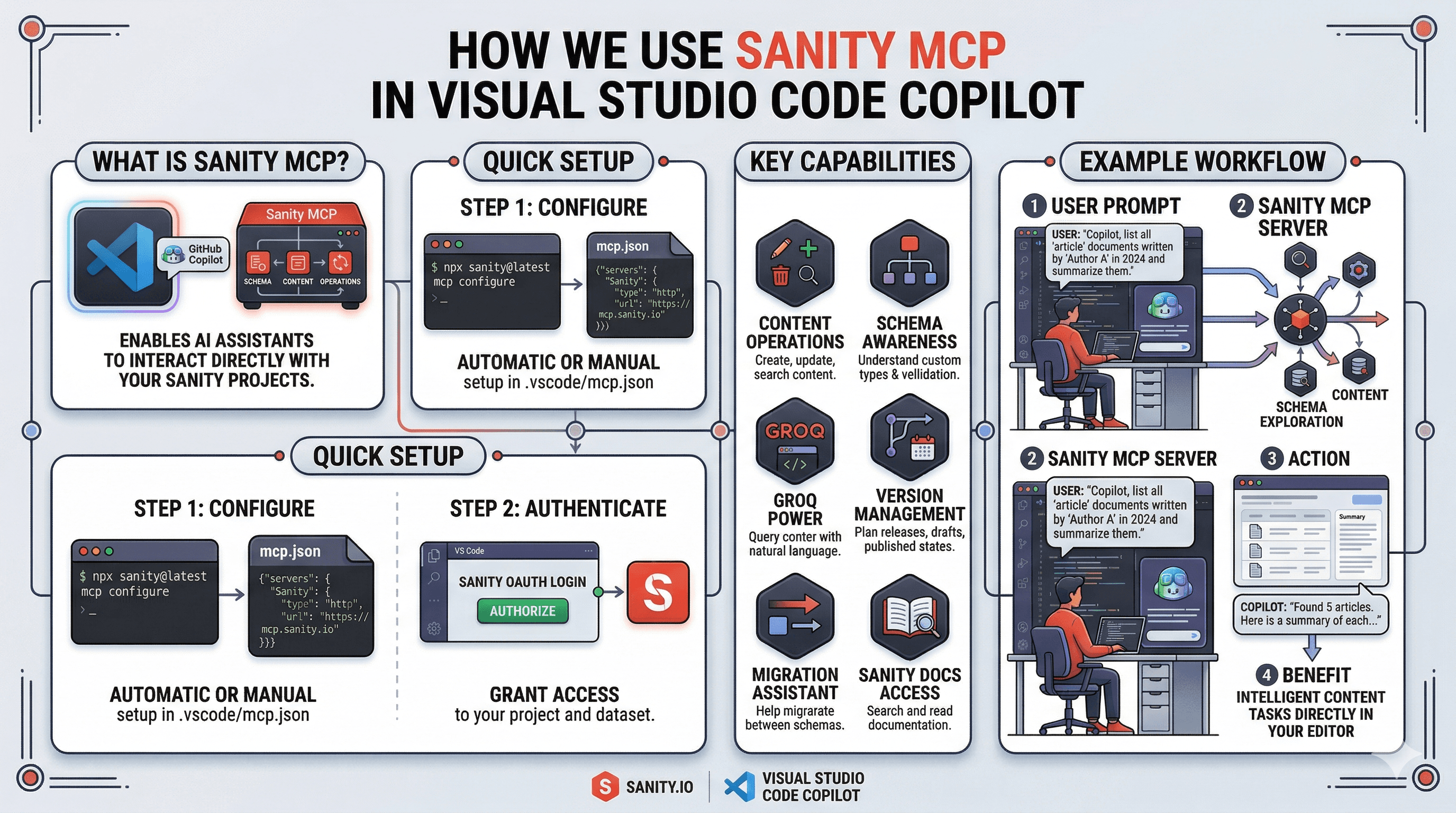
With the introduction of Sanity MCP (Model Context Protocol) and GitHub Copilot in VS Code, that context-switching is now a thing of the past.
You can query, create, update, and publish content directly from your editor — simply by describing what you want in natural language.
What Is Sanity MCP?
MCP (Model Context Protocol) is an open standard that allows AI assistants to communicate with external tools in a structured way.
With the official MCP server from Sanity, tools like GitHub Copilot can directly interact with your content.
The official MCP endpoint:
https://mcp.sanity.io
Through this integration, Copilot can:
- List datasets and schemas
- Query documents using GROQ
- Create new documents
- Patch and update existing content
- Publish or unpublish drafts
Instead of writing API calls or opening Sanity Studio, you simply tell Copilot what you want.
Why This Is a Big Deal
This is more than a feature — it’s a shift in how we manage content.
Traditionally:
- Devs write code → switch to CMS → manage content → switch back
Now:
- Devs stay inside Visual Studio Code
- Content operations happen inside the same workflow
Result: Faster, smoother, and more intelligent development.
Setting Up Sanity MCP in VS Code
To get started, you need a few things:
Prerequisites
- A Sanity project
- An API token (with read + write access)
- GitHub Copilot enabled in VS Code with MCP support
Configuration
Create or update your mcp.json file:
{ "servers":
  { "sanity":
    {
      "url": "https://mcp.sanity.io",
      "headers":
      {
        "Authorization": "Bearer YOUR_SANITY_API_TOKEN"
      }
    }
  }
}
Replace YOUR_SANITY_API_TOKEN with your actual token.
Once done, Copilot can now securely connect to your Sanity project.
How to Use It (Real Examples)
Move from Content Management to Intelligent Content Operations
This is where things get exciting
🔍 Query Content
Ask Copilot:
“Fetch all blog posts published in the last 7 days.”
Copilot:
- Converts your request into a GROQ query
- Sends it via MCP
- Returns structured results
No manual querying needed.
Create Content
“Create a blog post titled ‘Future of AI in CMS’ with draft status.”
Copilot will:
- Generate a document
- Fill required fields
- Save it in your dataset
Update Content
“Update the author of the latest post to Ayush Kumar.”
Copilot:
- Finds the document
- Applies the patch
- Confirms the update
Publish Content
“Publish the latest draft blog.”
Done. No UI. No clicks.
Key Benefits
1. Zero Context Switching
Everything happens inside your editor — no browser needed.
2. Natural Language Control
You don’t need to remember:
- GROQ syntax
- API endpoints
- Schema structures
Just describe what you want.
3. Faster Development
Content creation becomes part of your development lifecycle.
4. AI-Powered Content Operations
This introduces a new way of working:
Content is no longer “managed” — it is “operated.”
Best Practices
To use Sanity MCP effectively, keep these in mind:
Secure Your API Token
- Never commit it to GitHub
- Use environment variables or secrets
Work in Staging First
Test content operations before pushing to production datasets.
Maintain Clean Schemas
Structured schemas = better AI understanding = better results.
Track Changes
Combine MCP workflows with version control for better visibility.
Real-World Use Cases
Content Teams
- Draft and publish blogs without leaving VS Code
Developers
- Seed content while building features
Distributed Teams
- Collaborate without relying on a central CMS UI
AI Pipelines
- Automate translations, tagging, and updates
The Bigger Trend: Content Operations > Content Publishing
We’re entering a new phase in CMS evolution.
Earlier:
- Focus was on publishing content
Now:
- Focus is on operating content systems
This includes:
- Structured content for AI
- Real-time collaboration
- Automated workflows
- Schema-driven deployments
Sanity MCP fits perfectly into this shift.
The Rise of Agentic Content Systems
With MCP + AI, we are moving toward Agentic CMS systems.
These systems can:
- Read content
- Write content
- Update content
- Take actions automatically
Example:
An AI agent could:
- Detect outdated content
- Update metadata
- Republish it automatically
That’s the future.
Conclusion
Sanity MCP + GitHub Copilot transforms your workflow from:
❌ Switching tools
❌ Manual content updates
❌ API-heavy operations
Into:
✅ Conversational content management
✅ AI-assisted workflows
✅ Editor-first experience
Your code editor is no longer just for development —
it becomes a complete content command center.
Final Thoughts
If you’re working with modern headless CMS architecture, adopting MCP is not optional — it’s the next step forward.
Start small:
- Connect your project
- Try simple queries
- Gradually automate workflows
Soon, you’ll realize:
You’re not just managing content anymore —
You’re running content operations powered by AI
Frequently Asked Questions
What is How We Use Sanity MCP in Visual Studio Code Copilot?
Discover how the Sanity MCP integration with GitHub Copilot in Visual Studio Code lets you query, create, and manage your Sanity content directly from your editor using AI — no browser required.