Development / CMS
Sitecore AI and Sitecore Client API: Enhancing Headless Experiences
SSaurav Kumar6 Min Read
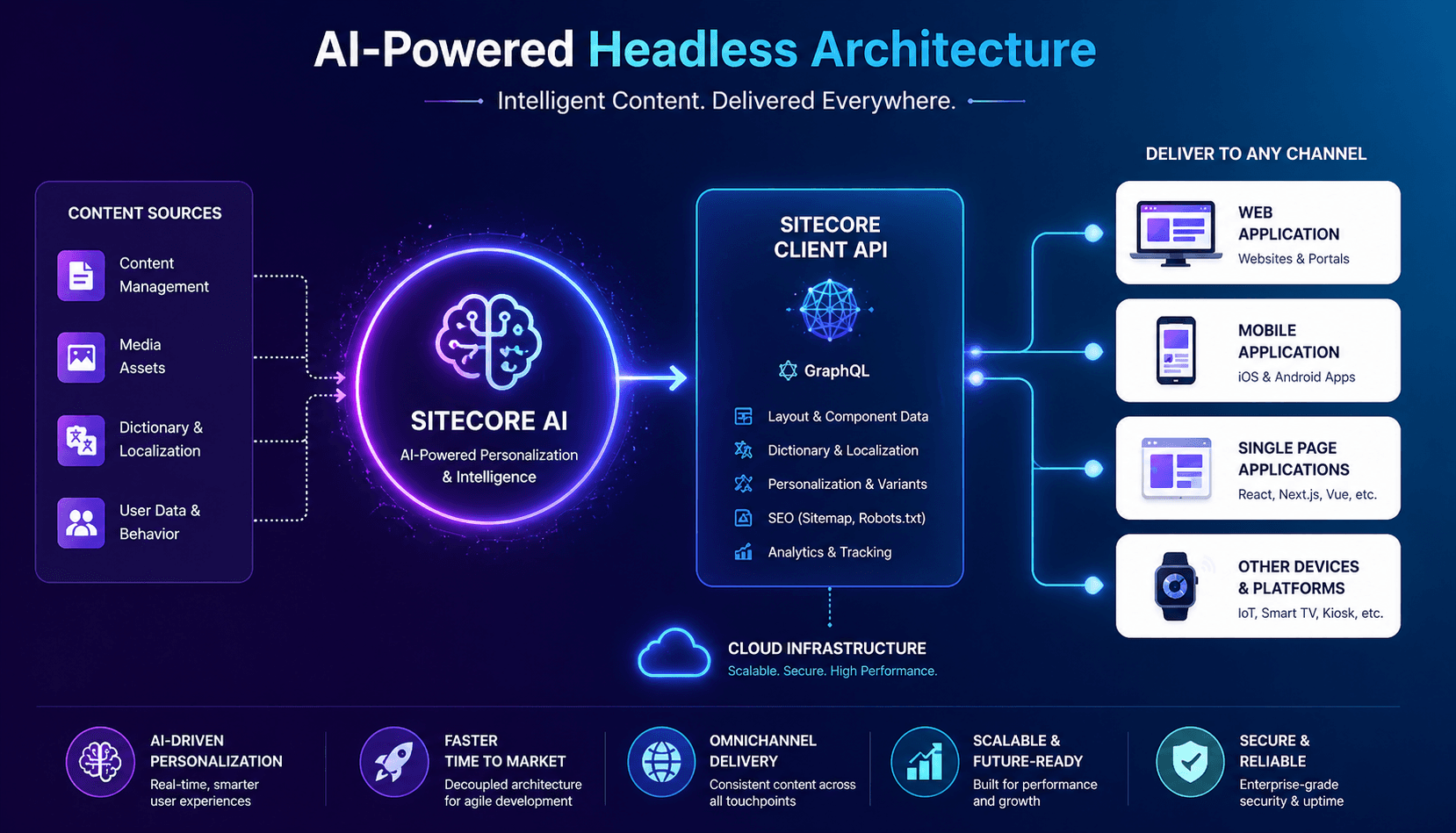
The digital experience landscape is rapidly evolving, and organizations are increasingly adopting headless architecture to deliver flexible, omnichannel solutions. With the emergence of Sitecore AI and the Sitecore Client API, developers now have powerful tools to build intelligent, scalable, and personalized applications.
This blog—inspired by the original article—dives deeper into how these technologies work together to enhance headless experiences.
Headless architecture separates the front end (presentation layer) from the back end (content and business logic). This allows developers to build user interfaces using any modern framework while retrieving content via APIs. (Sitecore)
In Sitecore’s ecosystem, this means:
This decoupled model enables scalability and flexibility, especially for enterprises managing complex digital ecosystems. (Sitecore Documentation)

Build scalable, personalized digital experiences using Sitecore AI, Client API, GraphQL, Next.js, and intelligent omnichannel content delivery.
Sitecore AI is a cloud-native, SaaS-based hybrid headless CMS designed to deliver personalized, data-driven experiences. (Sitecore Documentation)
Unlike traditional CMS platforms, Sitecore AI combines headless flexibility with visual authoring tools—giving both developers and marketers the best of both worlds.
At the heart of Sitecore’s headless implementation lies the Sitecore Client API—a unified interface that enables seamless interaction with Sitecore AI services.
What it does:
The API typically communicates through GraphQL endpoints, allowing front-end applications to request only the data they need. (Sitecore Documentation)
Sitecore AI analyzes user behavior and dynamically adjusts content, ensuring each visitor gets a tailored experience.
Using machine learning, it anticipates user needs and suggests relevant content before users even search for it.
Content adapts based on device, location, and user journey—creating a seamless omnichannel experience.
AI models improve over time, optimizing engagement and conversion rates automatically.
The Client API acts as the bridge between front-end applications and Sitecore’s backend.
Key responsibilities:
In essence, it ensures that even in a decoupled architecture, all components remain connected and synchronized.
To see how the SitecoreClient is initialized, you can refer to the configuration file included in the XM-Cloud-Starter-js example apps, which provides a basic setup example.
sitecore.config.ts.example — This file contains sample configurations.
sitecore.config.ts — This file is kept minimal, allowing users to add additional configurations as needed.
To initialize the SitecoreClient, you need a configuration object of type SitecoreClientInit, which is based on the SitecoreConfig type.
Let’s take a closer look at the key methods that can assist us in our daily development tasks when working with Sitecore AI and the Content SDK.
getComponentData — This method is used to retrieve component data, layout service data, and the context for both server-side and client-side props.
To make it easier to understand, I added a console log in my page.tsx file. This way, I can see the exact response I receive, which helps clarify things — even for beginners.
getDictionary — This method is used to obtain dictionary phrases for different sites.
To make this clearer, I created a sample key and phrase, then logged them to the console to check if they appeared without any additional code. The response was immediate — I saw the newly added key and phrase right away.
getErrorPage — This method is used to retrieve 404 and 500 error pages, or other error pages, based on the site and language.
To test this method, I created a page in Sitecore AI named “404” and added a Rich Text component with sample text. I then logged the response from the getErrorPage method. The log provides a clearer understanding of what this method returns.
getHeadLinks -This method is utilized for managing themes and styles.
getPage — This method is used to retrieve page data for a specified route through the layout service.
getPreview -It utilizes the EditingService to obtain preview page information and layout details.
getDesignLibraryData — It utilizes the ComponentLayoutService to fetch a Design Studio page.
There are a number of other commonly used methods that you can review in a similar manner to better understand their response structure and behavior, enabling you to use them effectively in your implementation. For example:
getData: This method provides a clean and type-safe way to run raw GraphQL queries directly via the SitecoreClient. It internally uses the SDK’s GraphQLClient.request, ensuring that configurations like retry policies, headers, and fetch options are consistently applied.
getRobots: This method leverages the RobotsService to fetch the robots.txt content for a given site, helping manage crawler directives in a headless environment.
getSiteMap: This method makes use of the SitemapXmlService to retrieve either a specific sitemap file or a sitemap index, supporting proper site indexing by search engines.
getPagePaths: This method utilizes the SitePathService to obtain static page routes for selected languages, which is especially useful for handling multilingual routing scenarios.
Imagine a headless e-commerce application:
This entire flow happens in milliseconds, delivering a highly responsive and engaging experience.
While powerful, this approach comes with considerations:
Sitecore AI and the Sitecore Client API together redefine what’s possible in headless CMS architecture. By combining intelligent automation with flexible content delivery, they empower organizations to create deeply personalized, scalable, and future-ready digital experiences.
We have reviewed the commonly used methods of the Sitecore client class, which help us understand how to interact between Sitecore AI and the Content SDK, allowing us to manage and modify content according to our needs.
I hope this post helps you get started with using the Content SDK together with Next.js.
Headless gives you freedom. Sitecore AI gives you intelligence. The Client API connects it all.
Together, they create experiences that are not just delivered—but truly understood.
Reference:
Happy Coding!
The Sitecore Client API, implemented through the SitecoreClient class, is a unified interface for interacting with SitecoreAI headless APIs and services. It can retrieve page, layout, component, dictionary, preview, sitemap and robots.txt data and can execute typed GraphQL requests.
SitecoreAI is Sitecore's current AI-native digital experience platform for managing content, data, personalization and AI-powered digital experiences across channels.
The SitecoreClient provides a consistent interface between frontend applications and SitecoreAI headless services. Applications can retrieve structured content, layout, personalization and other site data through APIs, commonly using GraphQL.
Yes. Sitecore's Content SDK provides Next.js-oriented tooling and the SitecoreClient can be used to retrieve SitecoreAI data, component information, preview content and other services in Next.js applications.
The SitecoreClient provides a typed getData method for executing raw GraphQL queries while reusing configured headers, retry behavior and fetch options. Content SDK applications also use GraphQL through SitecoreAI Experience Edge.
SitecoreAI can provide personalization variants and the SitecoreClient supports personalization-related data and layout processing, allowing headless frontend applications to render appropriate content variants.
The SitecoreClient can retrieve page and layout data, component data, dictionary phrases, preview data, error pages, static page paths, sitemaps, robots.txt and Design Studio data. It also provides typed access to raw GraphQL queries.
The SitecoreClient is the unified API interface for interacting with SitecoreAI headless services, while the Content SDK is the broader developer toolkit that provides core functionality and Next.js-specific components, helpers and application scaffolding.
A headless SitecoreAI architecture separates content management from frontend presentation, allowing teams to use modern frameworks such as Next.js while centrally managing content and delivering it through APIs.
Yes. The SitecoreClient and Content SDK are designed to support modern SitecoreAI headless applications, including content retrieval, personalization, localization, preview, SEO-related services and GraphQL-based data access.